Sourceweave counts the tokens your coding agents and personal agents use, estimates what that would cost through each provider's API, and lets you set daily or monthly budgets with alerts. Everything is recorded on your computer.
How Usage works in the current release of Sourceweave.
01
Your agents and models, in one place
Tasks, threads, swarm runs, routines, terminals and personal agents record the tokens their agents report in one place, by agent, model, workspace and source. Some CLIs don't report usage, such as Cursor, Amp, Command Code and Antigravity in terminals; their work isn't counted.
02
An API-equivalent estimate
Costs use a public model price list, so you can compare agents and models. Subscription plans aren't billed per token, and models without a price are counted without cost.
03
Budgets that warn, never block
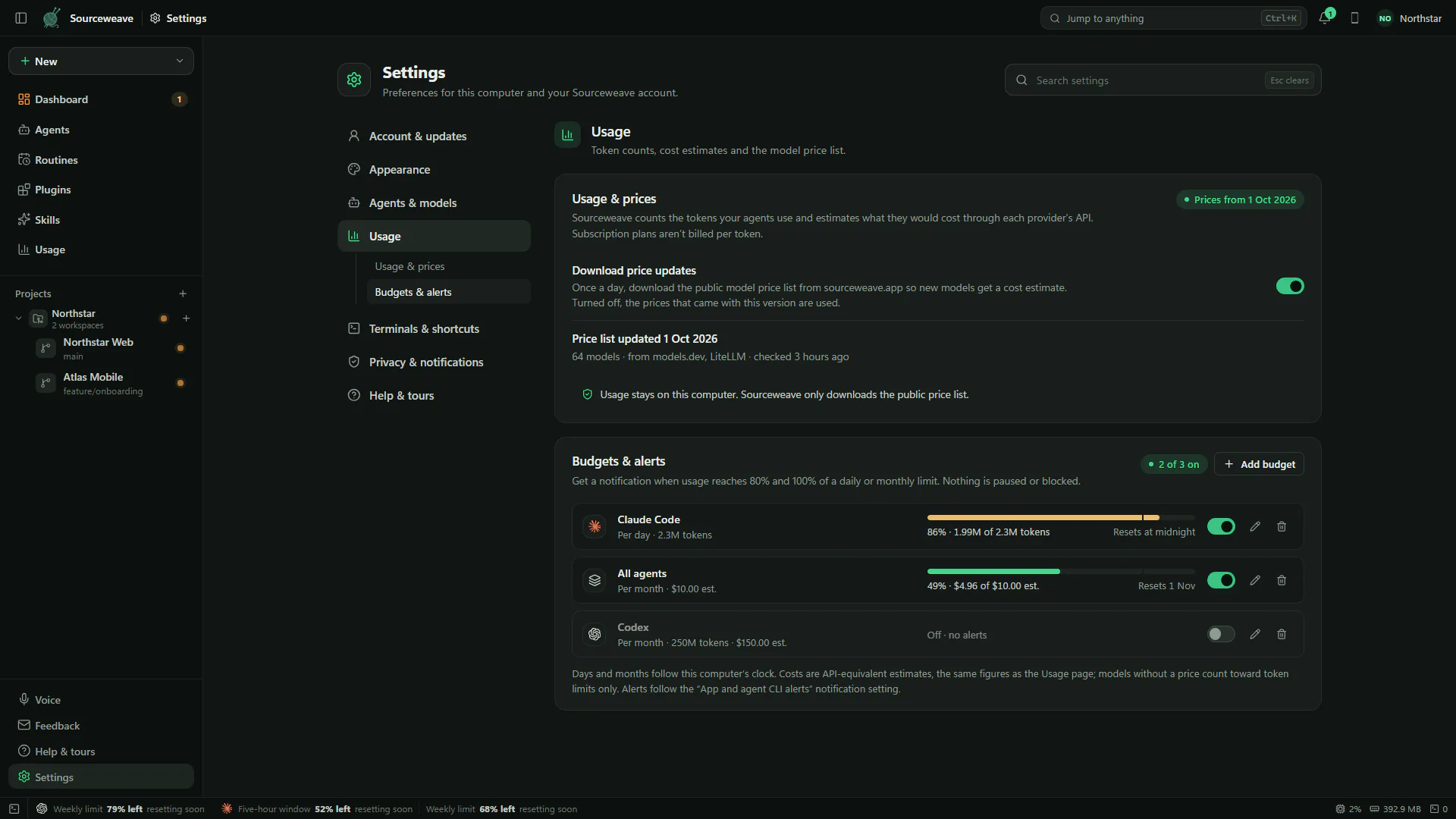
Set daily or monthly budgets for all agents or one agent, in tokens, cost or both. Sourceweave alerts at 80% and 100%; nothing is paused or blocked.
IN THE APP
Real screens from Sourceweave.
Captured from the desktop app with sample data, at 1920 × 1080. Select a screen to enlarge it.
Settings → Usage: the price list and your budgets and alerts.
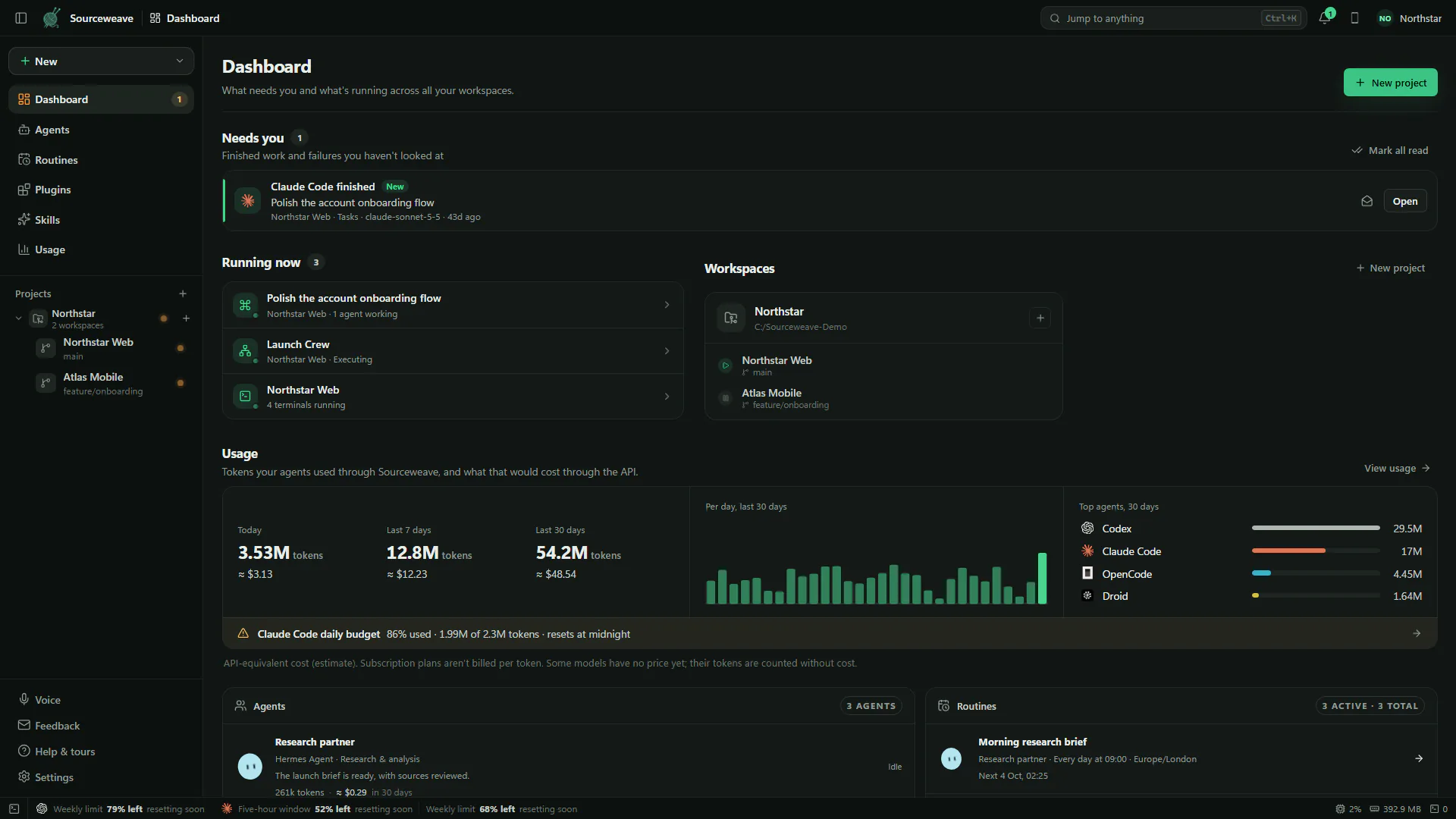
The Dashboard shows today, 7 and 30 days, top agents and any budget near its limit.
WHAT IT CHANGES
Fewer surprises. More informed choices.
01
Tokens in detail
See input, cached input, output and reasoning tokens, plus the number of agent turns recorded, for any range from today to a custom period.
02
Filter the way you work
Narrow usage to a workspace, an agent, a model or a source such as tasks, threads, swarms, routines or personal agents.
03
Cost where the work is
Agent attempts, swarm runs, routine runs and personal agents show their own tokens and estimated cost beside the work.
04
Daily and monthly budgets
Budgets cover all agents or one agent, with a token limit, a cost limit or both. Progress resets at midnight or at the start of the month.
05
Provider plan limits
The status bar shows how much of each provider's session and weekly limits remain for Codex and Claude Code, and when they reset.
06
Yours to export
Export the filtered ledger as a CSV file. Usage is stored locally; Sourceweave only downloads the public price list, and you can turn that off.
WHAT IS BUILT IN
The working surfaces behind Usage.
USAGE PAGE01
Totals, charts and a breakdown
Pick a range, filter by workspace, agent, model or source, and read tokens and estimated cost per day by agent, then break the period down by agent, model, workspace or source.
BUDGETS & ALERTS02
Limits that keep you informed
Add, edit or switch off budgets in Settings → Usage. Each one shows its progress on the Usage page, and an alert appears when it reaches 80% and 100%.
DASHBOARD03
The headline numbers every day
The Dashboard's usage card shows today, the last 7 and 30 days, a per-day chart and your top agents, with a line when a budget is close to its limit.
PRICES04
A public price list, kept current
Model prices come from public sources and update once a day when enabled. Each estimate is labelled as an API-equivalent cost, not a bill.
HOW IT WORKS
A deliberate path through Usage.
01
Work as usual
Run tasks, threads, swarms, routines and agents. Sourceweave records the tokens each one reports, without changing how the agents run.
02
Read the numbers
Open Usage from the sidebar or the Dashboard to see totals, charts and the agents and models behind them.
03
Set a budget
Add a daily or monthly budget in Settings → Usage for all agents or a single agent.
04
Get a heads-up
When a budget reaches 80% or 100%, Sourceweave lets you know. You decide what happens next.
SEE IT FOR YOURSELF
Try Usage in the demo.
Click through the real Sourceweave interface with a sample project, then bring your own agents.